
Key takeaways
- Accounts receivable automation software handles invoice delivery, payment collection, reminders, tracking, and reconciliation so finance teams stop chasing payments by hand.
- Manual AR is often the hidden cause of late payments. Atradius found that administrative inefficiencies in the payment process are the top reason US B2B invoices go overdue.
- The biggest buying decision is the category, not the vendor. Standalone AR tools, ERP add-ons, invoice tools, and all-in-one AP and AR platforms each solve a different problem.
- Integrations and payment options matter more than feature counts. A tool only helps if it syncs with your accounting system and lets customers pay the way they prefer.
- Plooto is an all-in-one AP and AR automation platform built for SMBs, accounting firms, and the controllers who manage cash moving in and out.
Accounts receivable automation software has moved from a nice-to-have to a working capital priority for SMBs and the accounting teams that support them. Late payments tie up cash, manual follow-up burns hours, and spreadsheet tracking breaks down the moment invoice volume climbs. This buyer guide breaks down what AR automation software actually does, how to compare the main software categories, which features carry real weight, and how finance leaders can build a shortlist that fits the way they work. The goal is simple. Help controllers, bookkeepers, fractional CFOs, and business owners choose a tool that gets invoices paid faster without adding another disconnected system.
Why accounts receivable automation software matters for SMB cash flow
AR automation software matters because receivables are where cash flow either accelerates or stalls. Every day an invoice sits unpaid is a day your business finances someone else's operations. Automating the invoice-to-cash cycle shortens that gap and gives finance teams a clear view of what is owed and when it should arrive.
What is accounts receivable automation software?
Accounts receivable automation software is a set of tools that streamline invoice delivery, payment collection, reminders, status tracking, reconciliation, and reporting. It connects each step of the invoice-to-cash cycle so the work happens automatically instead of one manual touch at a time. In practice, it replaces the spreadsheets, inbox searches, calendar reminders, and accounting-system exports that hold most manual AR processes together.
It helps to separate three terms buyers often use interchangeably. Invoice automation software focuses on sending invoices and collecting payment. Accounts receivable management software adds deeper collections workflows, dispute handling, and aging visibility. Broader payment platforms move money in and out and connect to your bank and accounting stack. When you automate accounts receivable, you are usually looking for a tool that covers most of that range, not just one slice of it. For a refresher on the underlying ledger concept, see how accounts receivable functions within finance.
Why does manual accounts receivable slow finance teams down?
Manual accounts receivable slows finance teams down because a single invoice triggers many small tasks after it is sent. Someone has to confirm delivery, watch for payment, send a reminder, log the response, match the payment, and update the ledger. Multiply that across hundreds of invoices and the work compounds fast.
Most payment delays start in the process itself, not with bad customers. The Atradius Payment Practices Barometer found that around half of all US B2B invoices were overdue in 2024, and the main reason cited was administrative inefficiency in the payment process rather than unwillingness to pay. Those overdue invoices were turned into cash about 20 days past the due date on average. When tracking lives in spreadsheets, version-control problems creep in. Two people edit different copies, notes get lost, and no one is certain which invoices are paid, partially paid, disputed, or waiting on approval. Mapping your current accounts receivable process is usually the first step in seeing where those breakdowns happen.
How does AR automation improve working capital?
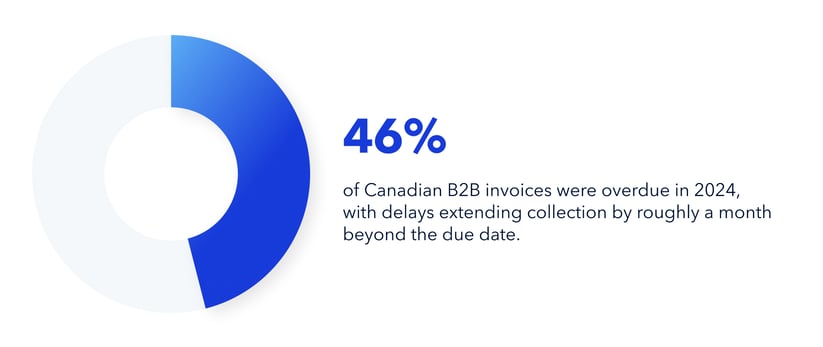
AR automation improves working capital by speeding up collections and making cash inflows more predictable. Faster follow-up and clearer visibility shrink the time between sending an invoice and seeing the money land. For Canadian businesses, the stakes are similar. Atradius reported that 46% of Canadian B2B invoices were overdue in 2024, with delays extending collection by roughly a month beyond the due date.
The benefits show up across the finance team:
- Faster, consistent customer follow-up without adding headcount
- Clearer visibility into outstanding invoices and aging buckets
- Fewer missed reminders and duplicate follow-ups
- More predictable cash inflows for owners, controllers, and finance managers
- A better customer experience through easier payment options
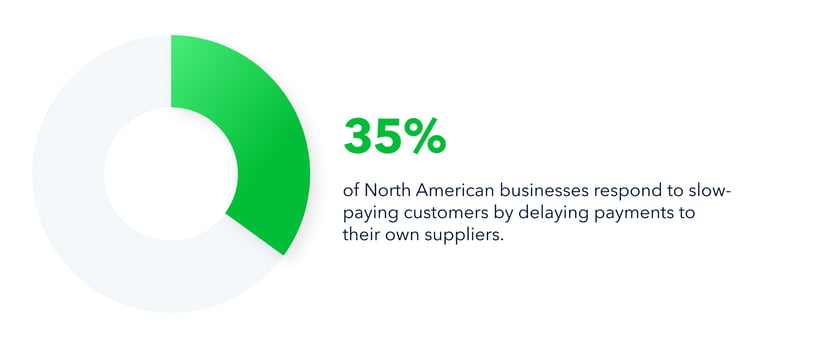
That predictability protects more than your own books. Late payments create a domino effect, and Atradius found that 35% of North American businesses respond to slow-paying customers by delaying payments to their own suppliers. Better receivables control helps you avoid passing that strain down the chain.
When is your business ready to automate accounts receivable?
Your business is ready to automate accounts receivable when manual tracking starts costing more time than it saves. The signal is rarely a single event. It is the slow accumulation of overdue invoices, scattered notes, and follow-up that depends on one person remembering to chase it.
Signs spreadsheets are no longer enough for AR tracking
Spreadsheets stop being enough when you can no longer answer basic questions quickly. Ask your team a few honest questions. Which invoices are overdue, partially paid, disputed, or waiting on customer approval right now? How often does someone manually rebuild the aging report? Are AR notes spread across spreadsheets, email, and accounting software? Is the owner or controller personally chasing late payments? If the answers are fuzzy, the spreadsheet has hit its limit.
Metrics that signal AR automation urgency
A handful of metrics make the case for automation in plain numbers. Track these to gauge urgency:
- Days sales outstanding, or DSO, which measures how long it takes to collect after a sale
- Average days to pay across your customer base
- Percentage of receivables that are overdue
- Collection effectiveness index, which shows how well you collect what is owed
- Number of manual follow-up touches per invoice
- Time spent reconciling payments each month
- Write-offs, disputes, and balances aging past 60 or 90 days
When these numbers trend the wrong way, the cost of manual AR is no longer hidden. It is showing up directly in your cash position.
Best AR automation software categories to compare before buying
The best AR automation software for your business depends on the category, so compare categories before you compare vendors. Four main types dominate the market, and each fits a different stage and structure.
Standalone accounts receivable software
Standalone AR tools are built for teams focused mainly on collections, reminders, disputes, and aging visibility. Their strength is depth. Collection queues and customer communication tools are robust. The watchout is scope. You may still need separate AP, payment, and reconciliation workflows, which means another system to manage. The question is direct: will this reduce AR work, or just relocate it?
All-in-one AP and AR automation platforms
All-in-one platforms combine receivables, payables, approvals, payments, and reconciliation in one place. They suit SMBs and accounting firms that want money in and money out managed together. The strength is fewer disconnected tools and stronger cash-flow visibility. The watchout is to confirm the AR features are deep enough for your collections process. The question: Can one platform manage both sides of cash without forcing a compromise?
ERP and accounting software add-ons
ERP add-ons fit businesses already committed to a mature ERP ecosystem. Native ledger alignment and centralized data are real advantages. The trade-offs are implementation time, configuration complexity, and consulting costs. The question is whether the add-on is flexible enough for SMB speed and everyday usability.
Invoice automation and payment collection tools
Invoice automation tools work for companies that need simple invoicing, payment links, and basic reminders. They are easy to set up and quick to learn. The limit is depth. They often lack deeper collections workflows, AP automation, or detailed reporting. The buyer question: Does the business need invoicing only, or full AR management?
AR automation tool categories at a glance
| Evaluation lens | Standalone AR tools | All-in-one AP and AR platforms | ERP add-ons | Basic invoice tools |
|---|---|---|---|---|
| Best for | Dedicated collections teams | SMBs and accounting firms managing both sides | ERP-centric finance teams | Small teams needing faster invoicing |
| AR workflow depth | High | Medium to high | Varies by ERP | Basic to medium |
| AP and AR in one place | Usually no | Yes | Sometimes | Usually no |
| Payment collection | Often supported | Core capability | Varies | Core capability |
| Automated reminders | Strong | Strong | Varies | Basic |
| Accounting integrations | Verify carefully | Often central to the value | Native or semi-native | Varies |
| Implementation speed | Medium | Fast to medium | Slow to medium | Fast |
Use this table as a filter, not a scorecard. Start with your current AR bottleneck, match the tool type to company size and accounting stack, and weigh the total workflow impact rather than the feature list alone.
Where Plooto fits in the AR software landscape
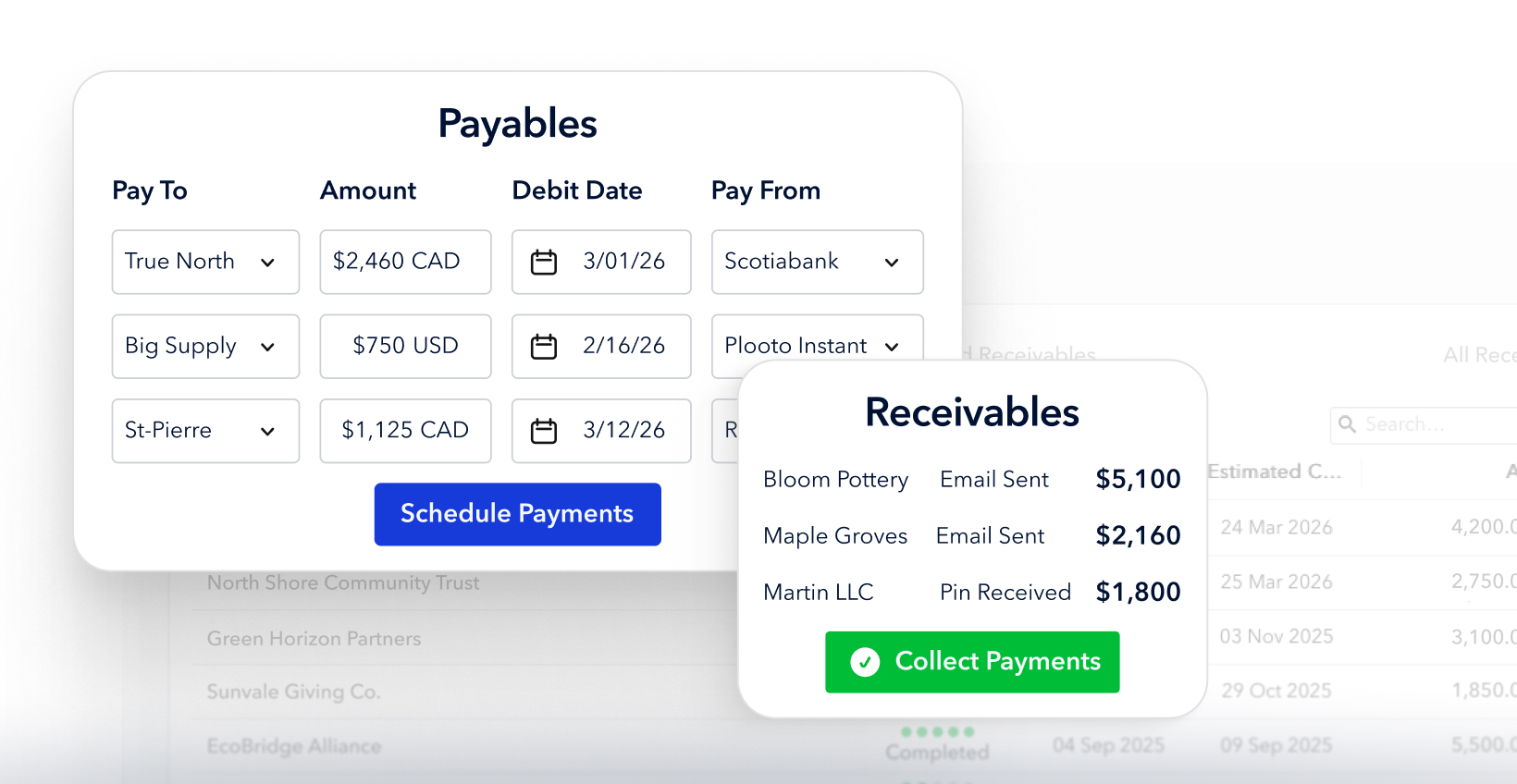
Plooto sits in the all-in-one AP and AR category, built for SMBs and the accounting professionals who run their finances. It brings receivables, payables, payments, approvals, tracking, and reconciliation into one connected workflow. For finance teams that want to cut spreadsheet tracking while keeping operations simple, that consolidation is the point. It is also a strong fit as AR software for small and mid-market businesses and multi-client accounting firms that need control without enterprise complexity. Businesses like Treefrog have used Plooto to simplify payments and collections while keeping their financial information in one place.
Must-have accounts receivable automation software features
The features that matter most are the ones that move cash and reduce manual work. Long feature lists look impressive in a demo, but only a few capabilities change your day-to-day outcomes. Prioritize these.
- Automated invoice delivery and tracking. The platform should send invoices and update their status to pending, paid, overdue, or failed without manual edits, and import or sync invoices from your accounting software to cut duplicate data entry. This is the backbone of an end-to-end invoicing and payments workflow.
- Recurring payments and automatic collection. Support for repeat billing handles retainers, subscriptions, memberships, and ongoing services. Pre-authorized debit lets customers approve recurring charges, which reduces month-end follow-up.
- Broad payment method support. Customers pay faster when they can use ACH or EFT, pre-authorized debit, credit cards where needed, and simple online payment links. This shift is well underway. The Association for Financial Professionals reported that cheques fell from 81% of B2B payments in 2004 to just 26% in 2024, while Nacha recorded an 11.6% jump in B2B ACH payments in 2024 to 7.3 billion transactions.
- Automated reminders and collections workflows. Reminders should fire before and after due dates, with cadence that varies by customer type, invoice value, or aging bucket. Good templates stay professional without sounding robotic, so collections improve without straining the relationship.
- Real-time AR visibility and reporting. A clear dashboard shows open, overdue, pending, and completed receivables and the cash expected by week or month, so owners get a quick read without opening five spreadsheets.
- Two-way accounting and ERP integrations. Sync should run in both directions with QuickBooks, Xero, NetSuite, or your ERP, and match payments back to invoices automatically. Strong accounting integrations are what keep reconciliation from becoming manual work again.
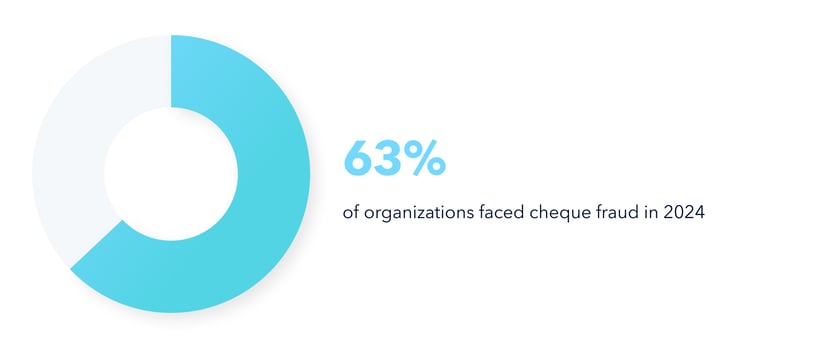
- Controls, permissions, and audit trails. Roles for owners, controllers, bookkeepers, and external accountants, plus a clean record of every reminder and payment action, strengthen financial control as you grow. This also reduces fraud exposure. The AFP found that 63% of organizations faced cheque fraud in 2024, far more than any electronic method.
How to evaluate AR automation tools and build a shortlist
The fastest way to a confident decision is to evaluate the workflow, not the brochure. Work through these five steps in order, and the right shortlist tends to reveal itself.
- Set your current-state AR baseline. Capture DSO, overdue AR, manual follow-up time, and reconciliation hours. Note the payment methods your customers already use and where they hit friction.
- Rank must-have, should-have, and future-state features. Must-haves usually include automated reminders, payment collection, accounting sync, and invoice status tracking. Should-haves cover recurring payments, customer segmentation, and approval controls. Future-state items include AP automation, multi-entity support, and deeper forecasting.
- Demo the actual workflow, not a generic tour. Ask each vendor to show invoice import, send, reminder, payment, sync, and reconciliation end to end. Count the clicks and manual decisions each tool requires.
- Pressure-test integrations and reconciliation. Confirm the tool syncs with your accounting system of record and ask whether it reduces reconciliation work or simply moves it. Surface integration limits during the demo, not after the contract.
- Calculate practical ROI and choose for the whole cash workflow. Weigh time saved on follow-up and reconciliation, faster collection, and better cash visibility. Then pick the tool that improves your entire cash workflow, balancing AR depth with how quickly your team can actually launch it.
AR automation built for SMB payment control
Plooto approaches receivables as one half of a single cash-flow problem. Money coming in and money going out both shape your working capital, so managing them in separate tools creates gaps. Plooto closes those gaps by handling both in one platform built for finance managers, controllers, accounting firms, and owners who need visibility without enterprise overhead.
For accounts receivable, Plooto supports the core workflow SMBs and their accountants rely on:
- Automated invoicing and payment collection workflows
- Recurring payments and pre-authorized debit collection
- Real-time payment status tracking
- Two-way sync with QuickBooks, Xero, and NetSuite
- Less manual receivables tracking and collections follow-up
The bigger advantage shows up when AR and AP run together. Pairing receivables with accounts payable automation turns two disconnected jobs into one cash-flow operating system. Fewer systems mean simpler reconciliation, cleaner reporting, and a clearer picture of cash for planning. For teams ready to consolidate, Plooto's accounts receivable automation software is built to do exactly that.
Common AR automation software mistakes to avoid
A few predictable mistakes derail otherwise good buying decisions, and they tend to show up later as recurring accounts receivable problems. Watch for these before you sign:
- Choosing software by the longest feature list. More features do not mean a better fit. Unused functionality slows adoption. Prioritize workflow fit, setup speed, and payment collection impact instead.
- Ignoring the customer payment experience. AR automation fails if customers still struggle to pay. Limited payment methods slow collections, while convenient options speed up cash flow.
- Underestimating integration and reconciliation work. "Integrates with" needs deeper validation. If reconciliation stays manual, the automation gains evaporate, so accounting-system alignment belongs at the top of your criteria.
- Buying AR software without AP visibility. Receivables are hard to manage in isolation from payables, since the two sides of your cash cycle are closely linked. An all-in-one AP and AR platform often outperforms separate point solutions because controllers can think in terms of cash operations, not isolated tasks.
Choosing AR automation that fits your finance team
The right AR automation software fits your finance reality, not a vendor's feature chart. Diagnose your current AR bottleneck first. Compare tool categories before vendors. Prioritize payment collection, integrations, automation depth, and implementation speed. Then validate the customer payment experience and accounting sync before you buy.
For SMBs and accounting firms, the strongest long-term play is usually a platform that improves the whole cash workflow rather than one slice of it. Automating receivables gives you more consistent collections, clearer cash-flow visibility, and less dependence on spreadsheets, all on a foundation that scales as invoice volume grows.
For teams that want to automate accounts receivable while also simplifying accounts payable, Plooto brings both into one platform. Start your free trial and put invoice collection, payment tracking, and cash-flow control on autopilot.
Sources
Association for Financial Professionals. Industry research on payment methods, fraud trends, and treasury practices, including the Digital Payments and Payments Fraud surveys. https://www.afponline.org/
Federal Reserve Financial Services. Operator and resource hub for US payment systems, useful for understanding ACH, wire, and instant payment rails. https://www.frbservices.org/
U.S. Small Business Administration. Government guidance on managing business finances, cash flow, and operations for small businesses. https://www.sba.gov/business-guide/manage-your-business
CPA Canada. National accounting body offering guidance relevant to Canadian finance teams and accounting firms. https://www.cpacanada.ca/


