
Key takeaways
- Cloud bookkeeping is how a practice runs, not a software purchase. The ledger is one layer in a workflow that stretches from bill intake to reconciliation.
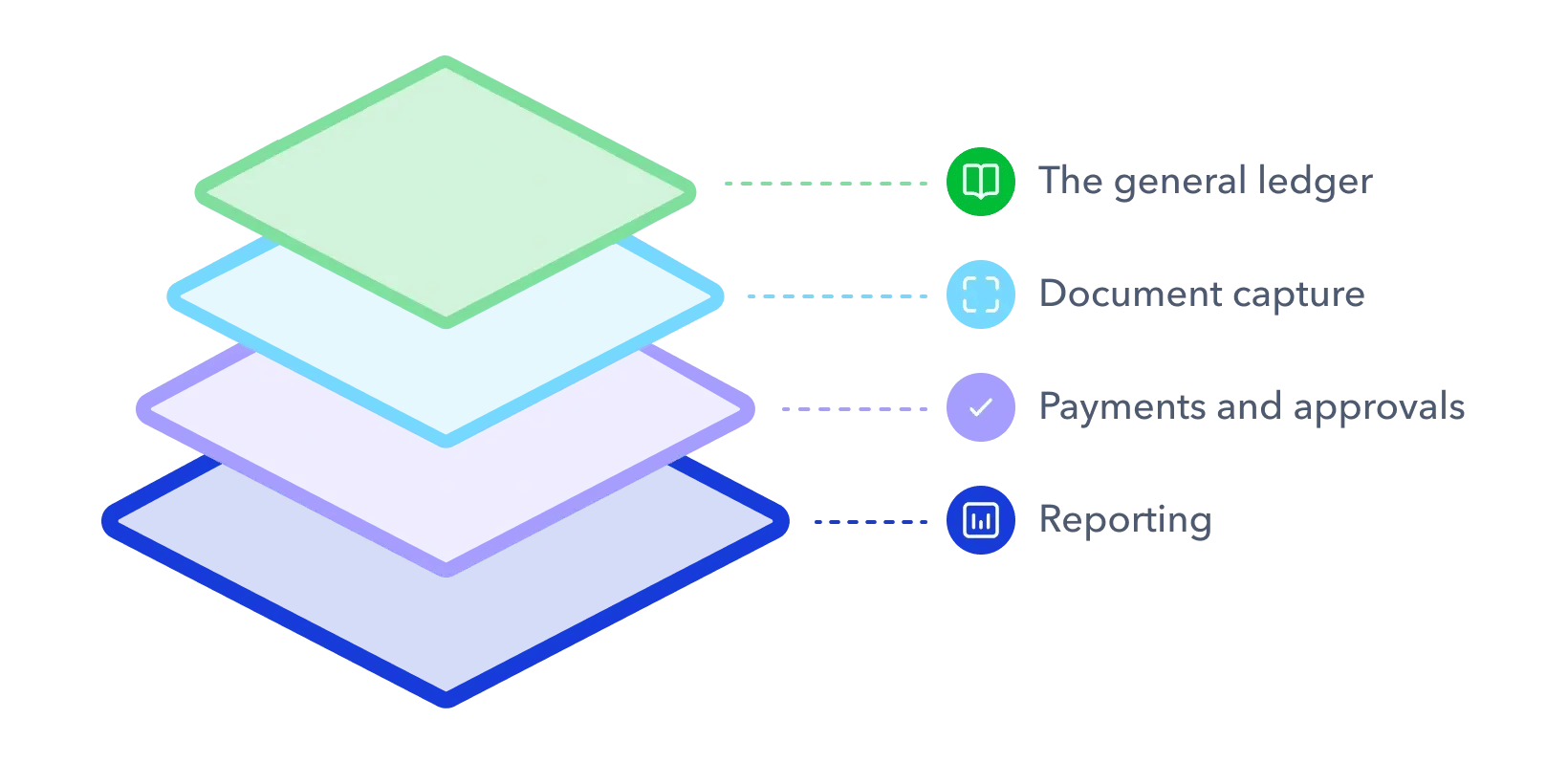
- The stack has four layers. A general ledger, document capture, payments and approvals, and reporting, all sharing one source of truth.
- Payments are the layer most firms leave manual. AI and bank feeds can balance the books, but they can’t move the money.
- Paperless still has rules. The CRA expects records kept for six years, and scanned originals can only be destroyed under its electronic record-keeping standards.
- Plooto adds client payment approvals to QuickBooks Online or Xero, so clients approve every payment without sharing their banking login.
- Move clients in cohorts. Map the workflow, standardize the ledger, set up approvals, then update engagement letters and pricing.
Monday morning at a growing bookkeeping practice looks familiar. A client can’t sign cheques because she’s travelling for two weeks. A stack of bills needs keying into the ledger, then keying again into a bank portal. And month-end catch-up is coming for the whole client book at once.
Cloud bookkeeping fixes that week, but not because of any single app. It’s a way of running the practice. This guide covers the cloud bookkeeping stack, how a bill moves through it, how to bring clients along, the pricing model it supports, and a step-by-step plan to move your practice over. The time savings are real. In a Plooto survey of more than 500 Canadian accountants, 58% said they save six or more hours a month with fintech.
What is cloud bookkeeping?
Cloud bookkeeping is the practice of recording, storing and managing client books on internet-hosted software that you reach through a browser or app. That software connects to bank feeds and other apps, so data moves between tools instead of being retyped. You’ll also hear it called cloud based bookkeeping, or cloud based accounting when the conversation turns to the ledger itself.
The “cloud” part has a formal definition. The NIST definition of cloud computing describes on-demand network access to a shared pool of computing resources run by a provider. For a bookkeeping practice, that means the books live on the provider’s servers, not on a machine in the back office.
Cloud bookkeeping vs. cloud accounting software
Cloud accounting software is the ledger. Cloud bookkeeping is the whole workflow the practice runs on, from bill intake through approval, payment and reconciliation. QuickBooks Online or Xero sits at the centre, but a practice can move its ledger online and still run on paper cheques and email approvals. That’s a cloud ledger, not a cloud practice.
Cloud accounting vs traditional accounting: Where the friction shows up
The biggest differences between traditional and cloud bookkeeping show up in the handoffs. Bills come in, approvals go out, money moves and records come back. The table compares both practices across eight dimensions.
|
Dimension |
Traditional bookkeeping practice |
Cloud bookkeeping practice |
|---|---|---|
|
Bill intake |
Paper or emailed PDFs, filed by hand |
Emailed or uploaded to a capture tool that extracts the details |
|
Data entry |
Keyed into the ledger, then again into the bank portal |
Coded once, synced between connected tools |
|
Payment authorization |
Physical cheque signing by the client |
Digital approval with a time-stamped record |
|
Approvals |
Email threads with no clear status |
Approval rules per client, status visible to both sides |
|
Bank access |
Client shares an online banking login with the bookkeeper |
Bookkeeper prepares payments, client approves, no shared credentials |
|
Reconciliation |
Manual matching at month-end |
Bank feeds and synced payments matched as they post |
|
Client visibility |
Reports emailed on a schedule |
Always-updated payment status and cash position |
|
Updates and backups |
Installed software, local backups |
Provider-managed updates and backups |
Paper bills and double entry
In a traditional practice, bills live in inboxes and filing cabinets. Every bill gets typed at least twice, once into the ledger and once into the bank portal. Each retype is a chance for a transposed digit, and the audit trail has gaps wherever a PDF went missing.
Cheque runs and shared bank logins
Cheque runs assume the client is available to sign. Travelling owners, remote clients and volunteer board treasurers often aren’t. The usual workaround, a client sharing their online banking login, is worse. A bookkeeper holding a client’s banking credentials carries liability that isn’t theirs, which is exactly why automating AP and AR helps limit your liability.
Cheques won’t disappear on their own, either. Payments Canada’s 2025 Canadian Payment Methods and Trends report found 57% of Canadian businesses expect to stop using cheques completely, while 24% believe they never will. Your practice will likely support both for years.
Approval chasing and month-end challenges
Approvals by email have no status. Threads get buried, payments go out late, and unmatched transactions pile up until month-end. Then the bookkeeper becomes the bottleneck for every client at once. Structured payment approval workflows replace the thread with a clear yes or no.
The cloud bookkeeping stack: What each layer does
A cloud bookkeeping stack has four layers and one source of truth. The ledger holds the books. Every other layer feeds it or reads from it.
Layer 1: The general ledger
The general ledger is the source of truth. For most Canadian practices, that means QuickBooks Online or Xero, both of which offer bank feeds and a multi-client view built for firms. QuickBooks outlines its cloud tools for accountants, and Xero has a practical guide to moving a practice online.
Layer 2: Document capture
Document capture tools read bills and receipts, pull out the vendor, amount, date and GST/HST, and code them to the ledger. Plooto Capture reads bills headed for payment, so AP bills don’t need a separate capture tool. Receipts and expense documents can still run through a dedicated capture app.
Layer 3: Payments and approvals
The payments and approvals layer moves the money. It’s the one layer that ledgers and AI don’t cover. Bills flow in from the ledger, clients approve them, and payments go out with a record of every step. AI can balance the books. It can’t send the payment. The Plooto section below shows how this layer works in practice.
Layer 4: Reporting
Reporting turns the ledger into advice. Client-facing reports on cash position and payables let the bookkeeper talk about what’s coming, not just what already happened. That’s how practices move from processor to advisor.
How a bill moves through the stack
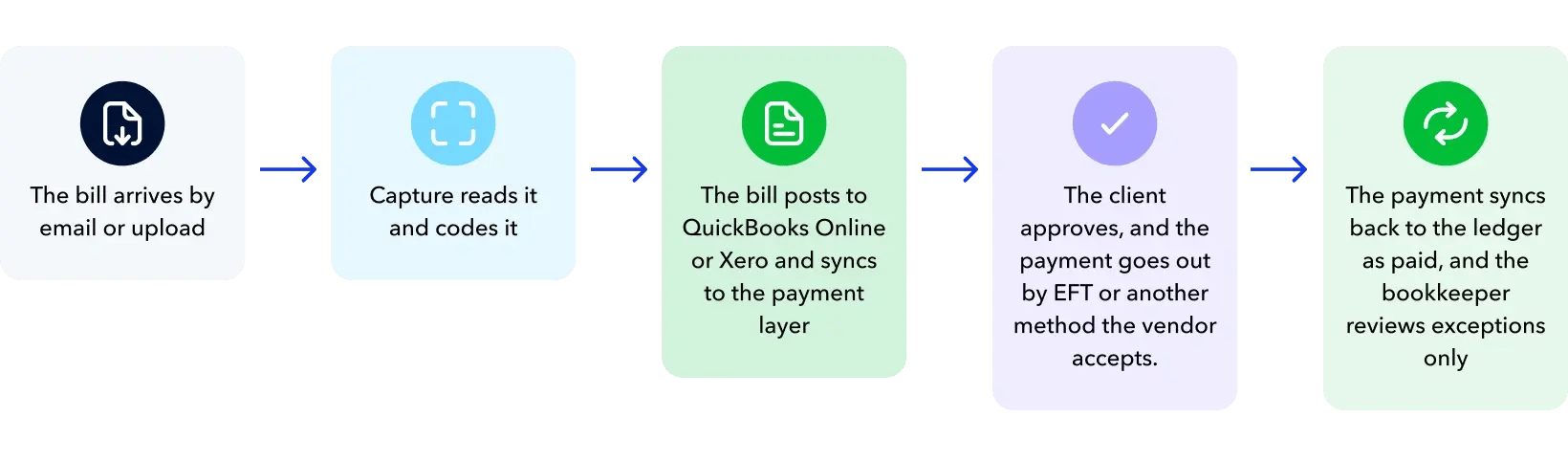
A bill moves through the cloud bookkeeping stack in five steps:
- The bill arrives by email or upload.
- Capture reads it and codes it.
- The bill posts to QuickBooks Online or Xero and syncs to the payment layer.
- The client approves, and the payment goes out by EFT or another method the vendor accepts.
- The payment syncs back to the ledger as paid, and the bookkeeper reviews exceptions only.
Paperless accounting: What it takes beyond scanning
Paperless accounting takes more than a scanner. The CRA’s guidance on keeping records sets three ground rules. Keep records for six years from the end of the last tax year they relate to. Keep them at your Canadian residence or place of business unless the CRA approves another location. And the business stays responsible for adequate records even when a bookkeeper keeps them.
Paper originals can only be destroyed once scanned images meet the CRA’s electronic record-keeping requirements. That means a documented imaging program, a logbook of what was imaged and when, and quality control on the images. Scanning alone isn’t enough.
Going paperless also forces two practice decisions:
- An approval authority matrix per client: Who approves what, and up to which amount.
- One agreed way to submit documents: A single email address or upload portal that every client uses.
Where Plooto fits in a cloud bookkeeping practice
Plooto runs in the background while you run your firm. It’s the payment and approval layer between each client’s ledger and bank, built for practices that manage many clients at once.
Client payments without the client’s bank login
With Plooto, the bookkeeper sets up the payment and the client presses approve. Approval rules and dual controls are set per client, and every payment keeps a record of who approved it and when. The firm never needs the client’s banking credentials and doesn’t take on payment liability.
BookCo Virtual Accounting built its nonprofit practice on this model. Because payments are controlled, approved and documented in Plooto, the firm could step into an advisory role with the boards it serves. Read how BookCo automated client payments, or see how Plooto for accountants pairs with its AP automation software.
Every client from one login
Plooto’s multi-client dashboard lets a firm manage every client from one login, with workflows tailored to each. Subscription and transaction fees can be billed directly to clients at no cost to the firm. Firms with three or more linked clients on paid Grow or Pro plans get their own base subscription waived, and firms paying for client plans can earn tiered discounts of 10% to 20%. The details are on Plooto’s pricing for accountants page.
Collecting client receivables
Plooto covers the other side of the ledger too. Clients can send invoices, collect recurring payments by pre-authorized debit (PAD) and accept credit cards, all with AR automation software on the same platform as payables.
Two-way sync with QuickBooks and Xero
Two-way sync keeps the ledger and the payment layer in step. Bills import into Plooto, go through approval, and completed payments sync back to the ledger as paid. The QuickBooks integration and Xero integration pages cover setup.
CRA remittances and Canadian payment rails
Plooto lets firms pay the CRA online through the same approval flow as vendor bills, covering remittances like GST/HST and payroll source deductions. It runs on Canadian rails, with EFT for payments and PAD for collections. For a Canadian practice, keeping CRA payments inside the same controls as every other bill removes one more manual process.
If your ledger is already in the cloud but your payments aren’t, Plooto’s accounts payable and receivable software closes that gap.
Why move to cloud bookkeeping? How to explain it to clients
Clients don’t buy a software stack. They buy a better week. Use this section as a talk track when you move a client over.
What changes for your client
For your client, cloud bookkeeping means approving bills from a phone instead of signing cheques at a desk. They can always see what’s been paid and what’s coming. Late fees and missed early-payment discounts become rarer because approvals no longer sit in an inbox. The comparison table earlier in this guide shows the rest.
Answering the questions clients ask
Four questions come up in nearly every client conversation. Here’s how to answer them.
Is my money safe?
Yes. Cloud payment tools use multi-factor authentication (MFA), role-based access and backups, the same kinds of controls the Canadian Centre for Cyber Security recommends in its baseline cyber security controls for small and medium organizations. More importantly, no payment moves without the client’s approval. Share how Plooto protects payments if they want the details.
Do I lose control?
No. The client approves every payment, and their banking login stays theirs.
What will it cost me?
Put the subscription fee next to the time they get back and the late fees they avoid. Keep the comparison concrete and skip ROI promises.
Do I have to learn new software?
Only the approve button. That simplicity also helps less tech-comfortable staff inside your own firm.
Bookkeeping as a service: The business model a cloud stack makes possible
Bookkeeping as a service (BaaS) is what a standardized cloud stack lets a firm sell. For firm owners focused on capacity and growth, this is where cloud bookkeeping pays off.
What bookkeeping as a service means
Bookkeeping as a service means fixed monthly packages delivered on one standard stack, instead of hourly billing for data entry. It isn’t offshoring, and it isn’t software resale. The stack makes delivery predictable enough to price in advance.
Packaging payments as a service
Payments make a natural premium tier. Build tiers around:
- Transactions per month
- Number of entities
- Bills paid per month
Put AP and payments in a higher tier, then decide whether software costs are absorbed into your fee or passed through to the client. Plooto’s breakdown of the cost of manual payments helps set a sensible price floor.
The capacity math
Capacity is where the model earns its keep. The table below is a worked illustration, not a benchmark. Swap in hours from your own baseline.
|
Scenario (illustration only) |
AP hours per client per month |
Clients one bookkeeper can serve with 60 AP hours |
|---|---|---|
|
Manual approvals, cheques and bank portals |
6 |
10 |
|
Automated approvals, payments and sync |
2 |
30 |
Real firms see the same direction of travel. Bear Hill Bookkeeping’s owner, Jesse Blades, says the time Plooto saves lets him take on more nonprofit clients. In the same Plooto research, 49% of accounting firms said they served more clients in the same amount of time once their clients adopted fintech.
How to move your bookkeeping practice to the cloud
Moving a practice to cloud bookkeeping works best as six steps, taken in order.
Step 1: Map your current workflow
Map every step from bill receipt to reconciliation for a few representative clients. Note where time goes, where errors happen and where approvals stall. The bookkeeper’s resilience checklist is a useful starting point for auditing your systems.
Step 2: Standardize on one ledger
Standardize on QuickBooks Online or Xero. The ledger decides which integrations every other layer can use, so one ledger means one set of connections to set up, train on and maintain.
Step 3: Choose the rest of the stack
Choose every remaining layer against the same criteria. Check the full list of accounting software integrations, then use this table to separate strong tools from weak ones.
|
Criterion |
What to look for |
Red flag |
|---|---|---|
|
Ledger integration |
Two-way sync with QuickBooks Online or Xero |
Export and import files |
|
Multi-client management |
One login, settings per client |
Built for a single business |
|
Controls and audit trail |
Approvals inside the tool, full payment history |
Approvals by email |
|
Pricing model |
Scales with client volume, can bill clients directly |
Per-seat pricing that grows with every hire |
|
Ease of use |
Clients approve with no training |
Clients need a walkthrough to pay a bill |
|
Canadian fit |
CAD, EFT, PAD and CRA remittances |
US rails only |
For a closer look at the payment layer, see how to choose AP automation software and what to expect from cloud AP and AR software built for remote teams.
Step 4: Set up payment approvals client by client
Connect Plooto to each client’s ledger and set their approval rules. Ask vendors to enter their own banking details rather than keying them in yourself, which keeps sensitive data out of your hands. Run the first cycle with a batch of low-value bills before moving larger payments.
Step 5: Move clients in cohorts
Start with clients who are comfortable with technology and have simple books. Use their results as internal examples for the next group. Give every client an onboarding checklist that covers:
- Bank connection
- How to submit documents
- Named approvers and their limits
Step 6: Update engagement letters and pricing
Update engagement letters to match the new workflow. Define who approves payments, which payment services are in scope, and that the client remains responsible for record-keeping under CRA rules. Then update your pricing to reflect the packages you built.
Build a cloud bookkeeping practice that grows with your clients
Where you start depends on where you are today:
- Still on desktop software? Move the ledger first.
- On QuickBooks Online or Xero but paying by cheque or bank portal? Payments and approvals are your bottleneck.
- Already in the cloud but inconsistent across clients? Standardize the stack and your templates.
Most growing practices sit in the middle group. The books are online, but the money still moves the old way. Try Plooto to connect QuickBooks Online or Xero and add client payment approvals without rebuilding the rest of your workflow.


