
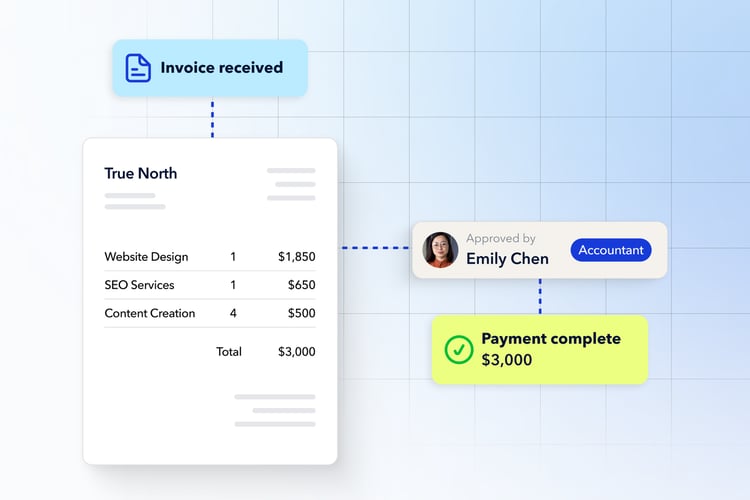
- AP automation software connects the whole invoice-to-payment chain, not just one step. The right tool handles invoice intake, data capture, approval routing, payment execution, reconciliation, and the audit trail in one place.
- Payment tools alone are not enough. Moving money faster does not help if approvals still stall in email and reconciliation still happens by hand.
- Choose for fit, not the longest feature list. Match the software to your invoice volume, your approvers, your payment methods, and your accounting stack.
- Canadian AP has specific needs. EFT for domestic vendors, cheque support where it still matters, and cross-border payments without painful fees.
- Plooto gives accounting teams and Canadian SMBs two-way accounting sync, approval workflows, and EFT, ACH, cheque, and card payments in a single platform.
Choosing AP automation software is really a question about your daily work. Most buyer guides talk to "finance teams" in the abstract. This one talks to the person who actually enters invoices, chases approvals, runs payments, and reconciles the books at month-end.
AP automation software replaces the manual parts of the accounts payable process with a connected workflow. If you want a refresher on what accounts payable means before you compare tools, start there. This guide assumes you know the basics and want to know how to choose. It is written for finance managers, controllers, and bookkeepers at Canadian small and mid-sized businesses, including the accounting firms that run payments for several clients at once.
What AP automation software does for the people who run AP
AP automation software takes the repetitive parts of paying bills off your plate while keeping you in control. It captures invoices, routes them for approval based on your rules, executes the payment, and updates your accounting records, all from one system instead of a patchwork of email, spreadsheets, and your bank.
That matters because the right tool reduces manual work without removing oversight. You still decide who approves what. The software just removes the chasing, the re-keying, and the guesswork.
What AP automation software actually automates
A full accounts payable automation platform handles the entire chain from a vendor invoice arriving to the payment clearing in your books:
- Invoice intake: Emailed invoices, PDFs, scanned documents, and recurring bills land in one inbox.
- Invoice data capture: OCR invoice processing reads the supplier, amount, due date, invoice number, and tax details so you stop typing them.
- Approval routing: Bills go to the right reviewer and approver, with a clear path for when someone is away.
- Payment execution: EFT, ACH, cheque, card, and international payments run from the same place.
- Reconciliation: Payment status flows back into your accounting software automatically.
- Audit trail: The system records who touched the bill, who approved it, and when it was paid.
OCR stands for optical character recognition, the technology that turns an invoice image into structured data your system can read.
Why payment software alone is not enough
Payment software moves money, but it does not manage invoice approvals. Accounting software stores bills, but it does not control payment execution. Real AP automation connects all four pieces: invoices, approvals, payments, and reconciliation.
This is the trap many buyers fall into. They solve one bottleneck and leave three others manual. A faster way to send a payment does not fix approvals that sit untouched for a week, and it does not close the loop in your ledger. Look for a tool that handles the whole process, not a single slice of it.
Signs you have outgrown manual accounts payable
You have outgrown manual AP when the process depends on memory, email threads, and one person's availability. The warning signs are usually about time, control, and risk.
Manual AP costs more than it looks
The obvious cost is hours. Invoice entry, approval chasing, cheque runs, and reconciliation eat a real share of every month at bookkeeper or AP-clerk pay rates. The hidden costs hurt more:
- Late fees when an invoice misses its due date
- Duplicate payments when the same bill gets entered twice
- Missed early-payment discounts you never had time to capture
- Time lost answering vendor "where is my payment" emails
Add those up and manual AP rarely looks cheap.
Approvals stall and vendors start chasing you
When approvals depend on the right person being at their desk, invoices sit. You have no quick view of what is approved, scheduled, or paid, so vendors call to ask for status you cannot give fast. Month-end accruals get shaky when payment timing is unclear. The process also tends to fragment as you grow. One tracker becomes several versions across email, Excel, and the accounting system, and invoice status starts living in someone's head instead of a system of record.
Weak controls raise fraud and error risk
A lean team still needs separation of duties. When one person can create a vendor, approve an invoice, and release a payment, the door is open to both honest mistakes and deliberate fraud. The risk is not theoretical. The ACFE found that organizations with fewer than 100 employees suffered a median fraud loss of $141,000, and that billing and payment tampering schemes are more common in smaller organizations precisely because they have fewer controls. More than half of the cases in that study were tied to a lack of internal controls or a management override of them. Payments Canada has also reported that 45% of Canadian businesses noticed an increase in fraudulent, cybercrime, or suspicious activity. Approval rules and a clean audit trail for accounts payable protect you on both fronts: they deter fraud and they make reviews painless.
The criteria that matter in AP automation software
The features that matter are the ones that touch your real workflow. Use these criteria as your evaluation checklist, not a feature beauty contest.
 Two-way accounting sync
The single most important criterion is whether the software syncs bills, vendors, payment status, and reconciliation both ways with your accounting system. One-way export still leaves you reconciling by hand. Confirm it supports your stack, whether that is QuickBooks Online, QuickBooks Desktop, Xero, or NetSuite, and ask what happens if a bill is edited in the accounting system after import. Plooto's accounting software integrations are a useful example of what real two-way sync should cover.
 Approval workflows that match how you actually approve
Good AP software lets you build an invoice approval workflow that mirrors how decisions really happen. Look for rules by dollar amount, vendor, department, entity, or client, plus tiers for owner, manager, controller, or external bookkeeper review. You want dual controls before payment release and clean delegation when an approver is away. Approvers should see enough context to approve confidently without hunting for the invoice.
 Invoice capture, audit trails, and reconciliation
These three features close the loop between the invoice arriving and the payment landing in your books. Invoice capture should read PDFs, emailed bills, and scanned documents, extract the key fields, and flag exceptions for a human to check. The audit trail should record who created, edited, approved, scheduled, and paid each bill, with supporting documents attached to the record and history preserved after payment. Reconciliation should update payment status in your accounting software automatically and make partial, voided, and failed payments easy to track.
 Payment-method coverage for Canadian AP
Your vendors decide how they want to be paid, so coverage matters. In Canada, EFT is the backbone of business payments. EFT carried 63% of total payment value in 2024 according to Payments Canada, and it is the standard rail for supplier and vendor payments. You also want ACH for U.S. vendors, cheque support where vendors still require it, and card and international options. Cheques are fading but far from gone. Canadians still write more than 350 million cheques a year, so a tool that cannot cut one will eventually leave you stuck. Check how vendor banking information is stored and secured.
 Security, fraud controls, and room to scale
Strong controls do not have to slow a small team down. Look for role-based permissions that separate who creates vendors, approves bills, and releases payments. Bank-account change verification, multi-factor authentication, and exception alerts for unusual vendors or amounts all reduce risk. The same platform should grow with you: more approvers, external accountant access without losing oversight, and rules that vary by entity or location, so a tool that fits a 10-person team still fits at 200.
 Pricing that reflects total AP cost
Look past the subscription line. Real cost includes transaction fees by payment method, plus international, cheque, and card fees, any user-seat limits, and implementation or migration costs. Then weigh that against the time saved and the errors avoided. The cheapest sticker price is not the cheapest tool if it leaves half your process manual.
3-way matching and approval routing
Approval routing decides how much scrutiny each invoice gets, and 3-way matching is the tightest level of that scrutiny. Both should scale with risk rather than apply equally to every bill.
What 3-way matching is and when you need it
3-way matching compares the invoice against the purchase order and the receiving document before payment. It confirms the vendor billed you for what you ordered and that you actually received it. Use it for inventory, physical goods, larger purchases, and higher-risk vendors. For recurring services, rent, and software, lighter paths usually make more sense. Our guide to 3-way matching in accounts payable walks through the full mechanics.
How to match approval depth to invoice risk
The goal is a payment approval process flowchart where the path depends on the risk, not a one-size-fits-all queue. A simple model:
- Low-risk recurring invoices: Capture, quick review, single approval, scheduled payment.
- Higher-value invoices: More review and a controller release.
- New vendors or bank-detail changes: Extra verification before any money moves.
For the full step-by-step process and a threshold matrix, see our deeper article on payment approval workflows.
How to choose AP software for your situation
Choosing AP software gets easier when you evaluate your own process first, then test tools against it. Work through these steps in order:
- Size up your AP volume and complexity. How many vendor invoices per month? How many people approve bills today? How many payment methods do vendors require? How often do you pay U.S. or international vendors? Do you use purchase orders, receiving documents, or inventory workflows?
- Map your current workflow before you watch demos. Note where invoices arrive, who enters them, who approves by amount or department, who releases payments, and who reconciles. Mark where delays and duplicate work actually happen. This map becomes your test script.
- Ask better demo questions. Push past the polished happy path and ask vendors to show real scenarios:
- "Show us how an invoice moves from inbox to paid."
- "Show us what happens when an approver is away."
- "Show us how a vendor bank-detail change is handled."
- "Show us the audit trail after payment."
- "Show us how payment status syncs back to QuickBooks or Xero."
- "Show us a failed payment, duplicate invoice, or approval exception."
- Avoid the common buying mistakes. Plenty of teams pick the wrong tool for predictable reasons:
- Choosing on price alone
- Choosing on OCR alone while ignoring payments and reconciliation
- Buying enterprise complexity before the team needs it
- Ignoring vendor payment preferences
- Forgetting external bookkeeper or accountant access
- Assuming accounting software alone solves approval and payment control
Comparing your options without the hype
The AP software market splits into five rough categories, and each solves a different problem. The right category depends on how much of the invoice-to-payment chain you need to cover.
| Category | Best fit | Strengths | Watchouts |
|---|---|---|---|
| Accounting software add-ons | Very small teams with basic bill entry and simple payments | Already connected to the ledger, familiar interface | Limited approval depth, payment constraints, weaker audit and workflow control |
| Bank bill-pay tools | Teams mainly trying to move money digitally | Familiar bank, simple domestic payments | Limited invoice intake, routing, sync, and reconciliation |
| Standalone payment software | Businesses focused on vendor payment execution | Multiple payment rails, payment tracking | May not handle approvals, OCR, coding, matching, or sync deeply |
| Full AP automation software | Teams ready to connect capture, approvals, payments, and reconciliation | End-to-end visibility, stronger controls, fewer handoffs | Check implementation effort, pricing model, and accounting-stack fit |
| Enterprise procure-to-pay | Larger organizations with procurement teams and complex PO processes | Deep procurement, vendor management, ERP integration | Heavier implementation, higher cost, more than most growing teams need |
The honest buyer question for each category is simple. For add-ons: does it automate AP, or just store bills? For bank tools: can it manage the full invoice-to-payment process? For standalone payment software: what happens before and after the payment? For full AP automation: does it reduce work while improving control? For enterprise procure-to-pay: are you buying control you need now, or complexity you will not use?
Where Plooto fits
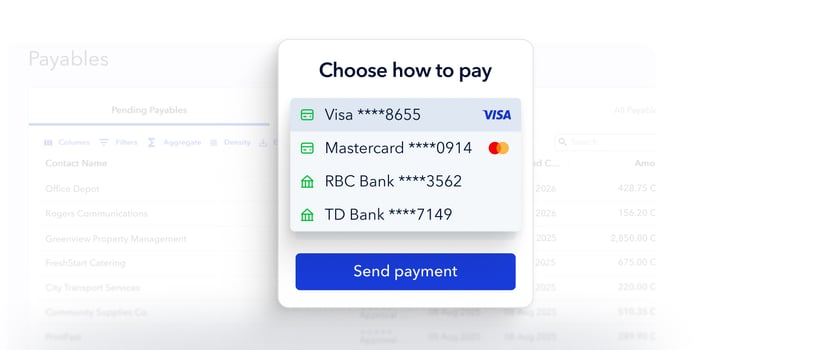
Plooto sits in the full AP automation category, built for Canadian businesses and the accounting teams that serve them. It is worth evaluating against the same checklist you would apply to any tool, not because it is being pitched, but because it maps cleanly to the criteria above.
How Plooto maps to the criteria
On the criteria that matter most, Plooto covers the core of the invoice-to-payment chain:
- Two-way accounting sync with QuickBooks, Xero, and NetSuite that cuts duplicate entry and reconciliation work.
- Approval workflows with custom rules and permissions, so the right people approve without email chasing.
- One place for payments across EFT, ACH, cheque, card, and international, instead of disconnected tools.
- A full audit trail that keeps reviews, tax filings, and month-end clean.
If it fits your situation, this is the kind of AP automation software for Canadian SMBs the earlier criteria point toward. The test is the same one you would run on any vendor: does it handle invoice approvals, payment workflows, and accounting sync the way your team actually works?
What AP automation looks like in practice
The proof of AP automation is in hours returned and dollars saved, not abstract efficiency. The clearest way to judge a tool is to look at what it does to a real team's month.
Time savings you can actually feel
Most of the savings come from killing four chores: cheque runs, invoice entry, approval chasing, and reconciliation. Greenhouse, a Plooto customer, saved roughly 40 hours per month and about $50,000 per year after moving its payments onto the platform. That is less payment admin and more time spent on cash-flow visibility. For a fuller breakdown of the numbers behind that kind of result, see our analysis of AP automation ROI.
Costs you cut beyond labour
The labour savings are only part of the return. Automating AP also trims paper-cheque costs, reduces bank fees and manual transaction costs, and lowers the risk of late fees and duplicate payments. There is less rework at month-end close, and predictable payment timing tends to improve vendor relationships, which is its own quiet form of savings.
Why fintech adoption matters for Canadian accountants
For accounting firms, the time savings translate directly into capacity. In a Plooto survey of more than 500 Canadian accountants, 58% said they save six or more hours per month with fintech, which adds up to as much as 132 hours a year, and 22% save 11 or more hours a month per client. Professional bodies like CPA Canada have documented the same shift, with automation moving accountants away from manual number-crunching and toward advisory work. For a bookkeeper juggling several clients, those reclaimed hours are the difference between keeping up and growing the book.
What better AP looks like after rollout
Once a platform is in place, the daily picture changes. Fewer invoices sit in email. Approvals move faster with clearer accountability. Payments get scheduled with real cash-flow visibility. Vendor status questions get answered in seconds, and the books update without a manual reconciliation marathon at month-end. Get familiar with the AP best practices to set yourself up for successful automation.
Choosing AP software that improves control and cash flow
The best AP automation software improves control and cash flow at the same time, and the right choice comes down to fit. Run your shortlist against a short, honest checklist before you commit:
- Strong two-way accounting sync and flexible approvals
- Reliable payment coverage for the methods your vendors use
- Clean audit trails and invoice capture that cuts data entry
- Reconciliation that actually closes the loop
- Security controls that fit a lean team
- Pricing that makes sense at your current and future volume
Then remember the simplest test of all. The best tool is the one your team will use consistently, so prioritize speed, visibility, control, and accounting-system fit over the longest feature list. Test the exceptions, not just the happy path. For the person who runs AP every day, the real question is whether the software reduces daily work or just adds another dashboard.
If you want to see how AP automation, approval workflows, and accounting sync work together, try Plooto and run it against the checklist above.


